
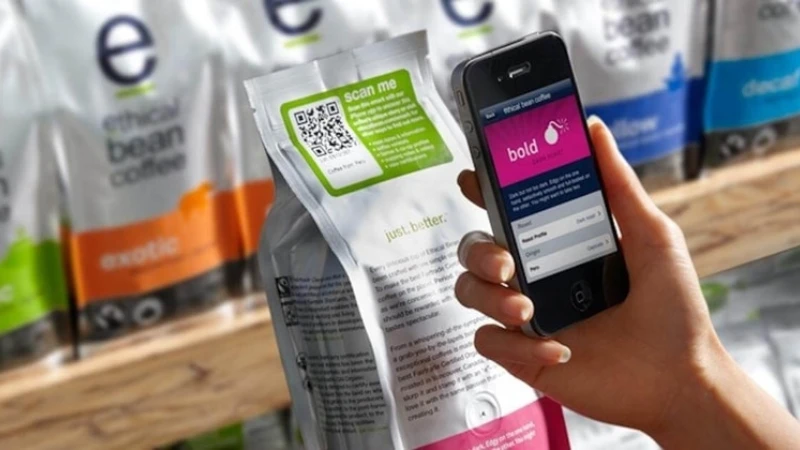
You use QR codes to link packages to online experiences, and brands are increasingly adopting them. In 2022, 92% of packaged goods companies utilized QR codes. The growth of smart packaging is remarkable, with smart label production increasing by 22%. This highlights the necessity for QR codes that scan effectively.
Consumers desire better packaging, and the QR code printing size minimum, along with resolution, plays a crucial role in ensuring successful scans. The correct size and high resolution prevent scan failures, while clear QR codes enhance trust in the product. This leads to easy and smooth experiences for users.
Evidence | Description |
|---|---|
66% of brands use QR codes on packaging | This indicates that brands are attentive to consumer preferences regarding QR codes. |
59% of consumers influenced by packaging | The appearance of packaging, including QR codes, significantly impacts purchasing decisions. |
Resolution and Scannability
Device Recognition and QR Code Quality
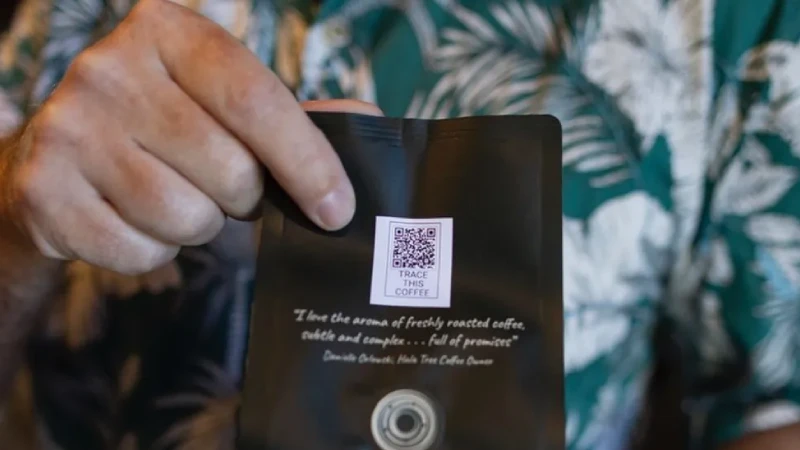
You want every customer to scan your QR code without trouble. The resolution of a QR code affects how well a smartphone or scanner can read it. If you use a low-resolution image, the code may look blurry or pixelated. This makes it hard for devices to recognize the pattern. High resolution keeps the edges sharp and the contrast clear. This helps scanners pick up the code quickly.
The minimum pixel size for a QR code depends on how much space you have and where you display it. For example, a QR code that measures 1 × 1 cm should have at least 38 × 38 pixels. If you use a 2 × 2 cm code, you need at least 76 × 76 pixels. For online use, you should aim for 150 × 150 pixels or more. The table below shows the recommended minimums for different display sizes:
Display size | Minimum pixel dimensions | Use case |
|---|---|---|
1 × 1 cm | 38 × 38 pixels | Small displays with limited space |
2 × 2 cm | 76 × 76 pixels | General-purpose display |
Online | 150 × 150 pixels or higher | Websites, emails, digital ads |
You should always use high-res formats like PNG or SVG when creating QR codes. These formats keep the image crisp, even if you resize it. If you use a format like JPG, you may lose quality and end up with a blurry code.
Blurriness and low resolution cause scanning problems. When the code is not clear, scanners cannot read it. This leads to failed scans and frustrated users. You want to avoid this by making sure your QR code meets the qr code printing size minimum and uses the right file format.
Modern smartphones can scan high-resolution QR codes easily. Older phones may struggle if the code is too small or too complex. The amount of data you put in the code also affects its size. More data means a more complex pattern, which needs a larger code to stay clear.
The table below shows how different devices perform when scanning QR codes. You can see that higher quality and resolution lead to more successful scans.
Model | Successfully Read QR Codes |
|---|---|
EDSR | 4,261 |
VDSR | 4,229 |
ESPCN | 4,255 |
SRCNN | 4,042 |
If you start with a blurry or low-res image, you will see more failed scans. This is why you must pay attention to both the minimum pixel size and the file format.
Impact of Printing Methods
The way you print your QR code affects its clarity and scannability. Different printing methods have their own strengths and challenges. Here is a quick overview:
Printing Method | Advantages | Challenges |
|---|---|---|
Quick turnaround, good for small batches | May have consistency issues, color fidelity problems | |
Offset/Flexo Printing | High-quality prints, efficient for large volumes | Not ideal for variable data printing |
Laser Printing | Durable, works in harsh environments | Limited to certain applications |
Some printing methods can cause problems. For example, low DPI printers may not print sharp edges. If you use the wrong paper, the ink can smudge or the dots can misalign. This makes the QR code blurry and hard to scan. Printing at a low resolution or using a non-vector image can also smear the crisp squares. If you enlarge the code without keeping the aspect ratio, you distort the grid and make scanning unreliable.
Tip: Always test your QR codes before mass printing. This helps you catch any issues with size, clarity, or scannability early.
You should choose materials that prevent ink bleed. Use vector formats like SVG or EPS for your QR code files. These formats keep the code sharp at any size. Make sure your printing method matches your needs. For small batches, digital printing works well. For large runs, offset or flexo printing gives you consistent quality.
The qr code size and the printing method work together to ensure your code scans every time. If you follow these guidelines, you will avoid common problems and give your customers a smooth experience.
QR Code Printing Size Minimum and Quiet Zone
QR Code Size and Physical Footprint
You need to pay close attention to the qr code printing size minimum when designing packaging. The minimum size for qr code on packaging is 2 × 2 cm. This size works well for close-range scanning, such as when someone holds a product in their hand. If your product sits on a shelf and customers scan it from farther away, you should use a larger qr code size. For scanning distances up to 12 inches, a size of at least 1 inch (2.5 cm) is best. For distances beyond 12 inches, increase the size to 2 inches (5 cm) or more.
The minimum size for qr code is 2 × 2 cm.
For close scanning, use at least 1 inch (2.5 cm).
For longer distances, use 2 inches (5 cm) or larger.
Always test print samples and scan them before mass production.
The qr code size affects how much data you can store and how easy it is to scan. Larger codes can hold more information and are easier to scan from different angles or distances. The table below shows how different qr code versions relate to size and data capacity:
QR Code Version | Size (modules) | Data Capacity |
|---|---|---|
Version 1 | 21×21 | Low |
Version 40 | 177×177 | High |
You can see that as the qr code version increases, the size and data capacity also increase. This balance between data and scan robustness helps you choose the right qr code size for your needs. QR codes use error correction to keep scanning reliable, even if part of the code gets damaged or dirty. You can adjust the error correction level to match your packaging environment.
QR codes work well because they can be captured from a distance or at skewed angles. They also encode many types of data in a compact format. When you select the right qr code printing size minimum, you improve scan reliability and user experience.
Tip: Always check the qr code printing size minimum on your packaging. Test the code under real conditions to make sure it scans easily.
Quiet Zone Requirements
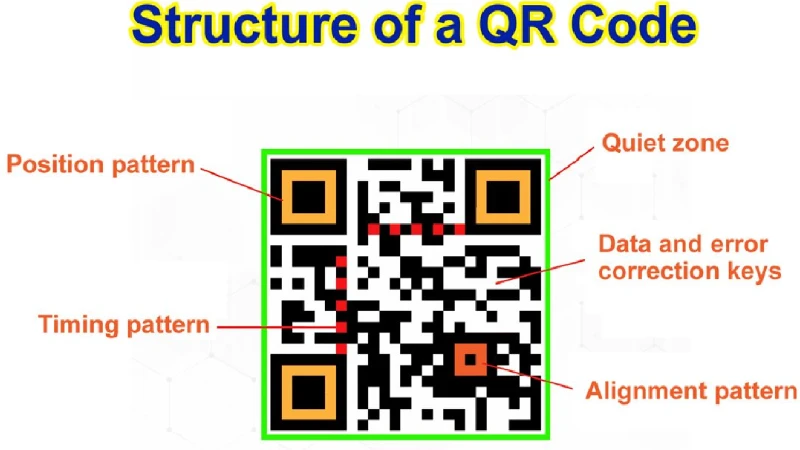
You must include a quiet zone around every qr code. The quiet zone is a blank space that surrounds the code on all sides. This area helps scanners tell the qr code apart from other graphics or text on your packaging. Without a proper quiet zone, scanners may not recognize the code, which leads to scanning errors or failed scans.
The quiet zone width should be at least four module widths on every side.
A module is the smallest black or white square in the qr code.
For example, if each module is 2 mm wide, the quiet zone must be at least 8 mm wide around the code.
The quiet zone acts as a buffer. It keeps the qr code separate from other design elements. If you skip the quiet zone or make it too small, you risk higher error rates and poor scan results. Scanners may struggle to find the edges of the code, especially if your packaging has busy backgrounds or bold colors.
The quiet zone is necessary for reliable scanning.
Without it, scanners may fail to read the code.
A good quiet zone improves scan success and user satisfaction.
The qr code size and quiet zone work together to ensure high quality and scan reliability. When you set the right minimum size and add a proper quiet zone, you help customers scan your codes quickly and easily. This attention to detail shows your commitment to quality and a smooth user experience.
Note: Always include a quiet zone that meets the minimum requirement. Test your qr codes on actual packaging to confirm they scan well in real-world settings.
Common Issues from Poor Quality
Failed Scans and User Frustration
You want every qr code to work right away. Low quality and bad resolution cause scanning trouble. If a qr code is blurry or too small, it is hard to scan. Sometimes, the qr code mixes with the background or links do not work. These mistakes make scans fail and users upset.
Here are some problems you might see with qr codes on packaging:
Problem Description | Explanation |
|---|---|
Overloaded with too much data | Scanning takes longer, and customers lose interest. |
Incorrect background color | The qr code becomes hard to see and scan. |
Blurry qr code | Low resolution makes the code unscannable. |
Size issues | The qr code is either too small to scan or too large for design. |
Missing or broken links | Customers see error pages, which hurts trust. |
About 52% of people have found qr codes that do not work. Almost half of them would not try another qr code from that brand. If you skip the minimum size or ignore qr code rules, you could lose customers.
Lost Engagement and Business Impact
If your qr codes do not scan, you lose more than one chance. Failed scans make users annoyed and stop them from connecting with your brand. Bad qr codes make your product look worse and can lower customer happiness. Using the wrong size or missing the minimum rules means you lose marketing chances.
You might notice these business problems:
Failed scans keep customers from learning about your product.
Bad experiences make people avoid your brand later.
Lost engagement means fewer people visit your website or join your campaign.
Brands sometimes make mistakes with qr codes. Some use the wrong density, which makes scanning hard. Others forget to update links, so codes do not work. Putting too many tracking tags in qr codes can slow them down. Testing qr codes in the wrong place means they might not work in real life.
Tip: Always follow qr code rules and test your codes in real life. Check the minimum size and resolution before you print. This helps you avoid problems and keeps your customers happy.
QR Code Guidelines for Packaging

QR Code Design Guidelines
You want your qr codes to work every time. Following qr code guidelines helps you make codes that scan fast and look good. Start with the right size. The best size is at least 1 x 1 cm. Bigger codes are easier to scan. Always use strong color contrast. Put a dark code on a light background. This makes scanning easier. Do not use shiny or reflective materials. A white matte layer under the code helps people scan it.
Here is a table of important qr code design rules:
Guideline Type | Description |
|---|---|
Size | Minimum 1 x 1 cm; bigger codes scan better. |
Contrast | Use at least 50% color contrast with dark and light colors. |
Material | Do not use glossy surfaces; add a white matte layer. |
Printing Quality | Print with high resolution to keep the qr code sharp. |
Placement | Put qr codes where people can see them, away from clutter. |
Customization | Personalize carefully; do not cover important parts with logos. |
Content Linking | Link to helpful content, not just a homepage. |
Compliance | Use dynamic qr codes to update links and follow rules. |
SVG is the best file format. SVG files keep your qr code clear at any size. You can make them bigger or smaller without losing quality. This is important for qr code printing rules and tips for good qr code design.
Best Practices for Quality Assurance
You need to follow qr code printing rules to keep your codes working. Always print at least 300 DPI. If you print a small code, use a high-resolution printer. Change the size by 0.2 inches for every five rows or columns if you print at lower resolution. Test your qr codes before you publish them.
Work with your design, print, and marketing teams. This helps your qr code stay clear and use strong materials. It also matches your marketing plan. Put the code where people can see and scan it easily.
Before you print a lot, test your qr codes on different devices. Try scanning in different lighting and on different surfaces. Scan from different distances. Make sure the link loads fast. Pretend you are in real life to check if your qr code works well.
Bonus qr code guidelines: 79% of shoppers like products with qr codes that give extra information. Good-looking codes can make people trust your brand up to 40% more. Always follow these rules to keep your qr code design strong and your customers happy.
You improve scan reliability when you focus on qr code resolution and quality. The quiet zone around every qr code helps scanners find the code and reduces errors. You should always keep the quiet zone clear. The zone must be wide enough for the scanner to see the qr code’s edges. A strong quiet zone means fewer misreads and better results. You help your brand stand out when you use the right qr code size and a proper quiet zone. Many consumers trust brands that use qr codes with a clear quiet zone. You can update qr codes to match new trends without reprinting. The quiet zone supports qr code success and long-term loyalty. Keep checking your qr codes and quiet zone as packaging changes. You give customers a better experience when you follow these steps.