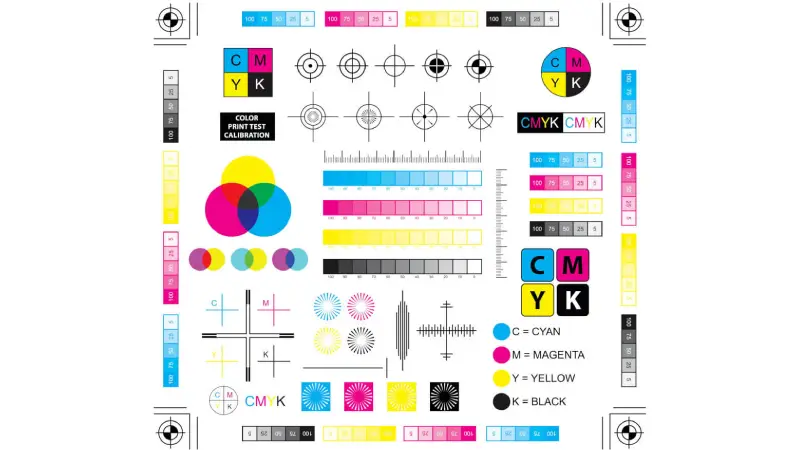
You see colors look bright with the CMYK color model in packaging. This system uses cyan, magenta, yellow, and black to make bold designs on flexible materials. The CMYK process helps you get many colors and keeps color accuracy strong. When you pick the right color model for pouch printing, you keep your brand’s look safe. BN PACK uses new technology to give exact color results and steady quality every time.
BN PACK’s skill makes sure your packaging looks special and fits your ideas.
Understanding the CMYK Color Model
What is the CMYK Color Model
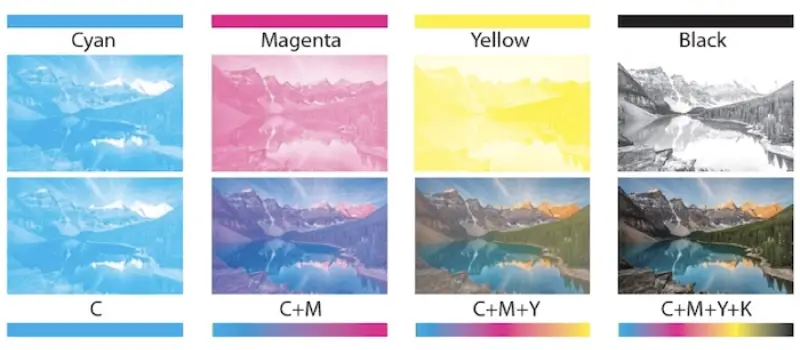
You use the CMYK color model when you want to print packaging that looks sharp and professional. This system stands for Cyan, Magenta, Yellow, and Black. It works as a subtractive color model. Each ink absorbs certain wavelengths of light. Cyan absorbs red, magenta absorbs green, and yellow absorbs blue. Black adds depth and detail to your design. When you layer these inks, you create a wide range of colors. This process is called the four-color printing process. You see this method in most packaging, magazines, and posters.
Cyan absorbs red light
Magenta absorbs green light
Yellow absorbs blue light
Black gives detail and shadow
In the subtractive color model, you start with white paper. Each layer of ink subtracts light, making the final color. This method lets you control how your printed pouch will look.
CMYK vs. RGB Color Models
You might wonder how CMYK compares to RGB. RGB stands for Red, Green, and Blue. It is an additive color model. You see RGB on screens like computers and phones. RGB creates bright and vibrant colors by adding light. CMYK, as a subtractive color model, uses ink to absorb light. This means CMYK cannot match the full range of colors you see on a screen.
Color Model | Gamut Type | Description |
|---|---|---|
RGB | Additive | Produces bright, vibrant colors for digital displays. |
CMYK | Subtractive | Limited color range, best for print materials like packaging. |
When you design for print, you need to use the CMYK color model. If you design in RGB, your colors may shift or look dull when printed. Some bright colors in RGB do not exist in CMYK. This is why process color printing uses CMYK for accurate results.
Why Printers Use the CMYK Model
You get the best results for packaging when you use the CMYK color model. Printers rely on this system because it gives stable and predictable colors. The CMYK model works with all types of printing presses. It ensures your pouch design looks the same every time. If you use RGB, you may see color shifts and lose control over the final look. CMYK supports spot colors, which help keep your brand colors consistent. BN PACK uses advanced process color printing to make sure your packaging matches your vision. You can trust this method for reliable and high-quality results.
Tip: Always set your design files to the CMYK color model before sending them to print. This step helps you avoid surprises and keeps your brand colors true.
Importance of CMYK in Pouch Design
Accurate Color Reproduction for Packaging
You want your product to stand out on the shelf. The cmyk color model helps you achieve this by making sure your pouch design looks bright and true to your brand. When you use cmyk, you get accurate color reproduction. This means the colors you see in your design match what appears on your printed pouch. Accurate colors play a big role in how people see your product.
Color is often the first thing shoppers notice. It draws their attention to your pouch.
Accurate color reproduction shows your brand values. It tells customers you care about quality.
Bright and consistent colors make your product look high-end.
If you use the wrong color model, your pouch may look dull or off-brand. The cmyk process helps you avoid these problems.
Brand Consistency with BN PACK
You need your packaging to look the same every time. Consistency builds trust with your customers. BN PACK uses advanced printing technology and strict quality checks. This ensures your brand colors stay the same across every pouch. The cmyk color model allows for precise color matching. You keep your brand identity strong and clear.
Precise color matching keeps your brand message clear.
Consistent colors help customers recognize your product.
Inaccurate colors can confuse shoppers and hurt your brand’s reputation.
BN PACK’s team works with you to make sure every pouch meets your standards.
Real-World Impact of the CMYK Model
You see the benefits of the cmyk color model in real pouch designs. For example, food brands use cmyk to create eye-catching snack pouches with bold reds and greens. Coffee companies rely on cmyk to keep their logos sharp and their colors rich. BN PACK has helped many brands achieve vibrant, consistent packaging that stands out in stores. When you choose the right color model, you make your product more appealing and trustworthy.
Tip: Always check your design in cmyk before printing. This step helps you avoid surprises and keeps your packaging looking its best.
How to Use CMYK in BN PACK Pouch Design
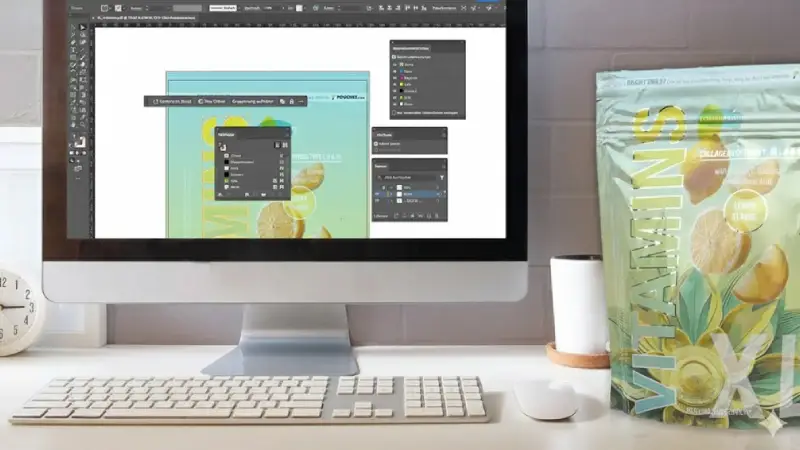
Designing pouches with the cmyk color model helps you get the best results in print. You want your packaging to look sharp, vibrant, and true to your brand. BN PACK makes this process easy with a digital workflow and many customization options. Here’s how you can set up your design for success.
Setting Up Design Files in CMYK
You start by preparing your design files the right way. This step is important for getting accurate colors and clean prints. Follow these steps to set up your files for cmyk pouch printing:
Choose the cmyk color mode in your design software. This prevents color surprises when you print.
Use high-resolution images. Set your images to at least 300 pixels per inch (PPI). This keeps your pouch graphics sharp and clear.
Add bleeds to your design. A bleed of 0.25 inches ensures your artwork prints to the edge. Keep important text and logos inside a safe zone of 0.5 inches from the edge. This avoids accidental trimming.
Tip: Double-check your file settings before sending them to BN PACK. This saves time and helps you avoid costly mistakes.
Choosing Colors in the CMYK Color Model
Picking the right colors in the cmyk color model is key for strong brand impact. You want your pouch to stand out and match your vision. Cmyk uses cyan, magenta, yellow, and black inks to create a wide range of colors. Some colors you see on screens may not print the same way, so always select colors from the cmyk palette.
BN PACK gives you many ways to customize your pouch. You can choose from different sizes, materials, and printing techniques. Here’s a quick look at your options:
Customization Aspect | Details |
|---|---|
Sizes | 4oz–5lb |
Materials | Recyclable PE, kraft paper, plant-based films |
Printing Techniques | CMYK, Pantone, metallic inks |
You can match your brand’s needs with these choices. BN PACK’s digital workflow lets you preview your design and make changes before printing. This helps you see how your cmyk colors will look on the final pouch.
Preparing Artwork for Printing
Once you finish your design, you need to prepare your artwork for printing. This step makes sure your pouch looks great and meets BN PACK’s standards.
Save your file in a print-ready format, like PDF or AI.
Check that all colors use the cmyk color model.
Outline your fonts to avoid missing text.
Make sure all images are embedded, not linked.
Review your design for any errors or missing elements.
BN PACK’s team reviews your files and gives feedback if needed. You can work with their experts to adjust your design and get the best print quality. Their digital workflow makes it easy to track your order and see updates in real time.
Note: Preparing your artwork carefully helps you avoid delays and ensures your pouch looks exactly how you want.
Using the cmyk color model with BN PACK’s advanced tools and support, you can create packaging that stands out on the shelf and builds trust with your customers.
Common CMYK Mistakes and Solutions
Designing in RGB Instead of CMYK
Sometimes, you might start your design in RGB. Screens use red, green, and blue light. This can cause problems when you print. RGB colors look bright on your computer. But they may look dull or different after printing. Printers use the CMYK color model. This model blends cyan, magenta, yellow, and black inks. If you send artwork in RGB, colors can shift. You might get poor print quality.
Common mistakes include:
Making artwork in RGB mode.
Sending files in RGB for print.
Mixing up RGB and CMYK color models.
To stop these problems, always start your design in CMYK mode. This keeps your colors true when printed. BN PACK’s team can help change your brand colors to Pantone or CMYK values. This gives you better color consistency.
Tip: Set your design software to CMYK before you begin. This easy step saves time and keeps your colors right.
Overlooking Color Shifts
You might not see color shifts until you print your pouch. These shifts happen when colors look different on screen than in print. You can stop this by checking your artwork closely.
Steps to catch color shifts:
Start new documents in CMYK mode.
Use Overprint Preview to check print results.
Set raster effects to 300ppi for clear images.
Use global swatches for easy color changes.
Run preflight checks before exporting your file.
BN PACK checks your files and gives proofing. Their experts match colors and fix designs before printing. This helps you avoid surprises and makes sure your pouch looks great.
Ignoring Print Specifications
You need to follow print specifications for the best results. Each material and pouch style changes how colors look. If you skip these details, your design may not print right.
Specification Type | Details |
|---|---|
Color Specifications | Use Pantone or CMYK values for true color. |
Material Impact | Materials like clear films or shiny surfaces change color appearance. |
Color Matching | Ask for color matching on real production materials. |
Registration Tolerances | Allow for 3-5mm movement in your design. |
Seal Area Keep-Outs | Keep 10-12mm clear space around seal areas. |
Graphic Placement | Plan how graphics wrap around the pouch when filled. |
BN PACK’s quality control checks color matching, proofing, and inspections. Their process finds errors early and keeps your packaging looking good.
Note: Always check print specifications and ask BN PACK’s team for help. This helps you get the best color results for your pouch design.
Tips for Vibrant Results with BN PACK
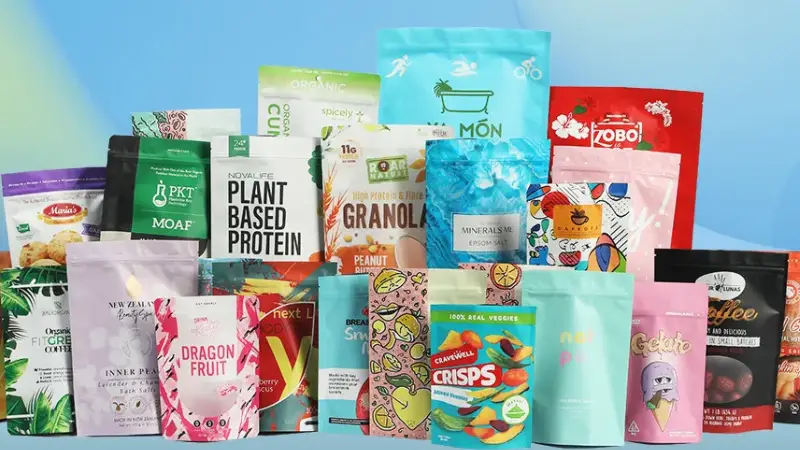
Using Color Profiles in CMYK
You want your pouch colors to look the same each time. Color profiles help printers match your brand’s colors. These profiles tell printers how to print your colors right. If you use a standard color profile, like ISO Coated v2, your colors stay steady. This works even if you print on different days or materials. Using color profiles also helps you match Pantone colors or make special shades for your brand.
Benefit/Practice | Description |
|---|---|
Consistent Color Reproduction | Makes sure your brand colors look the same every time, so your brand stays strong. |
Color Accuracy and Branding | Getting colors right is important for your brand. It lets you match Pantone colors or make your own shades. |
Use of Color Profiles | Use standard color profiles (like ISO Coated v2) to keep colors steady on any printer. |
Tip: Always check your design software uses the right color profile before you start.
Collaborating with BN PACK Experts
You get the best results when you work with BN PACK’s team. Their experts know how to make your pouch design pop. Here are some easy steps you can follow:
Start your design in the CMYK color mode.
Make sure your screen shows colors close to print colors.
Use ICC color profiles that fit your printer and material.
Give high-quality files, at least 300 DPI, for clear prints.
Remember, screen colors may not look like printed colors.
Ask for a printed sample before printing a lot.
Check that the ink works well with your pouch material.
BN PACK’s team will help you at every step, so your packaging always looks great.
Testing and Proofing Designs
Testing and proofing help you stop color mistakes. You can use color samples from old jobs to check your colors. Color management software helps you match your design to these samples. During printing, you can check colors to keep them right.
Use color samples or proofs to check your colors.
Match colors with color management software.
Check colors during printing to keep them steady.
Note: Careful testing and proofing help you feel sure your pouch will look just how you want.
When you use the CMYK color model, your pouch designs look great. The table below explains how CMYK helps your brand:
Benefit | Description |
|---|---|
Brand Recognition | Makes your brand colors match and easy to see in stores. |
Versatility | Works with many pouch types and materials, so you have more design options. |
Eco-Friendly | Uses inks and materials that are better for the environment. |
BN PACK’s team helps you get the right colors and strong packaging every time. You can follow these easy steps to make your designs better:
Begin your artwork in CMYK mode.
Use the correct color profiles.
Check your files to make sure they are clear.
Choose the best materials and inks.
When your colors stay the same, shoppers remember your brand, like Coca-Cola’s red or McDonald’s yellow. Look at your designs now and use CMYK tips to help your packaging stand out.